
What Is a Personal AI Agent?
Most people use AI through an app like ChatGPT. It keeps your past conversations, but it only works when you open it and ask, and it can only act inside that chat window.
A personal AI agent is different. It runs on a server you own, stays on 24/7, and remembers everything across conversations. You message it on Telegram from your phone like you'd message a coworker. It can browse the web, run code, manage files, and connect to other tools. It learns your preferences over time.
Think of it as the difference between Googling something and having an assistant who already knows your business and tools to execute.
OpenClaw is an open-source framework that makes this possible. It turns Claude into a persistent agent with tool access, memory, and messaging channels. This article walks through how to deploy it to a VPS (your own server in the cloud) using a script we wrote to automate the process.
Why a VPS?
You could run OpenClaw on a computer at home. But a VPS gives you:
- Off your home network. Your agent gets full control of the machine it runs on. On a VPS, that machine sits in a data center, away from your personal files and the other devices in your house.
- Reliable. It runs in a data center, so a power or internet outage at home doesn't take your agent down.
- Flexible. Resize the server, or wipe it and start over from a fresh image in minutes.
- Affordable. A capable VPS costs $5-15/month, with no hardware to buy.
You rent the hardware, but you control what runs on it and the data it holds.
The One-Command Setup
You run our script once from your computer. About 10 minutes later, your agent is live and you can message it on Telegram. Along the way it:
- Locks down your server so only you can get in
- Installs OpenClaw and connects it to Claude
- Connects your Telegram bot, set so it only answers you
It uses OpenClaw's own official installer and setup steps. Nothing custom, just the documented process done for you.
What You'll Need
- A Mac or Linux computer to run the script from (on Windows, use WSL)
- A VPS with your SSH key installed
- A Telegram bot token (takes 30 seconds to create)
- Your Telegram user ID
- An Anthropic API key or a Claude subscription setup-token
The steps below walk through each one.
Step by Step
Get a VPS
A VPS is a Linux server you rent by the month. You get full control of it, nothing else runs on it, and it runs in a data center around the clock. Your agent lives here.
I recommend OVHcloud. This walkthrough uses their VPS-1: 2 vCores, 4 GB RAM, 40 GB NVMe, $5.35 a month, no commitment. Total comes out to $5.71 with taxes/month for your own box to run OpenClaw. Pick Ubuntu (latest LTS) as the image.
Set Up SSH Access
Our deploy script logs in to your VPS over SSH, so you need to be able to log in without a password before you run it.
First, log in once with the access details from your provider:
ssh ubuntu@YOUR_VPS_IP
Accept the host key fingerprint when prompted, change the password if your provider asks you to, then log out. We will lock down the VPS later to only accept SSH logins using your key.
If you've never made an SSH key on your computer, make one (press Enter at each question):
ssh-keygen -t ed25519
Next, copy your SSH key to the VPS from your own computer:
ssh-copy-id ubuntu@YOUR_VPS_IP
Now ssh ubuntu@YOUR_VPS_IP should connect without asking for a password. Once it does, you're ready to deploy.
Note: these commands are written for Mac and Linux. On Windows, run them inside WSL.
Set Up a Telegram Bot
Telegram is how you talk to your agent.
Message @BotFather on Telegram, send /newbot, and follow the prompts. Save the token it gives you (looks like 123456789:ABCdefGHIjklMNOpqrsTUVwxyz).
Then message @userinfobot. It replies with your user ID (looks like 987654321). You'll give this ID to the deploy script, which sets your agent to answer only that account.
Get Claude Access
Your agent needs one of these:
- An API key. Sign in at platform.claude.com, go to API Keys, and click Create Key. It starts with
sk-ant-api. - A Claude subscription setup-token. Run
claude setup-tokenon a computer with Claude Code installed. It starts withsk-ant-oat.
Deploy
git clone https://github.com/ortegarod/openclaw-vps-deploy.git
cd openclaw-vps-deploy
./deploy.sh
The script asks for your VPS IP, bot token, Telegram ID, and your API key or setup-token. Nothing shows on screen as you type or paste them.
Or pass everything as flags:
./deploy.sh \
  --host YOUR_VPS_IP \
  --telegram-token "YOUR_BOT_TOKEN" \
  --telegram-user-id YOUR_TELEGRAM_ID \
  --api-key "YOUR_ANTHROPIC_API_KEY"     # or: --token "YOUR_SETUP_TOKEN"
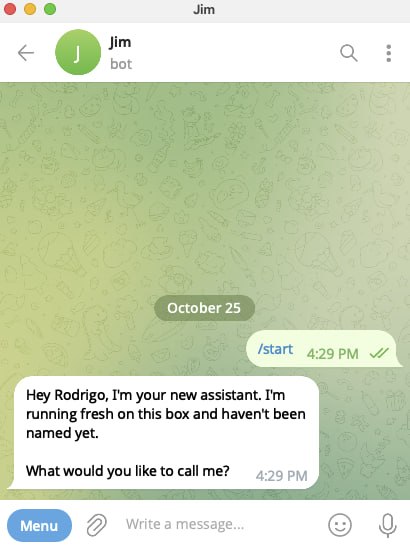
That's it. When it finishes, open the link BotFather gave you (t.me/your_bot) and tap Start. Your agent replies:
What You Get
- Your own AI agent, powered by Claude, running 24/7 on your server
- You chat with it on Telegram, and only you can
- Your server is locked down, so nobody gets in without your key
- A set of files that define your agent's identity, memory, and personality, ready to customize
Those files are how you shape what your agent knows, how it behaves, and what it remembers. This is where a generic AI becomes your AI. OpenClaw's workspace docs explain each file.
The agent can browse the web, run code, search files, and use any skill from ClawHub. It remembers conversations across sessions. It can be proactive: checking things on a schedule, reaching out when something needs attention.
Get the Script
The script is open source: github.com/ortegarod/openclaw-vps-deploy
If you're comfortable with the command line, the README has the same steps in short form. Clone it and try it.
If you'd rather have someone handle the setup, feel free to reach out. We run AI agents like this every day.
MIT-licensed. Source: github.com/ortegarod/openclaw-vps-deploy. Contributions welcome.